How Authors Can Send ARC Books
Directly to Amazon Kindle
Deliver watermarked, anti-piracy protected digital review copies directly to your readers' Kindle paperwhites, tablets, and apps in 3 fast, effortless steps.
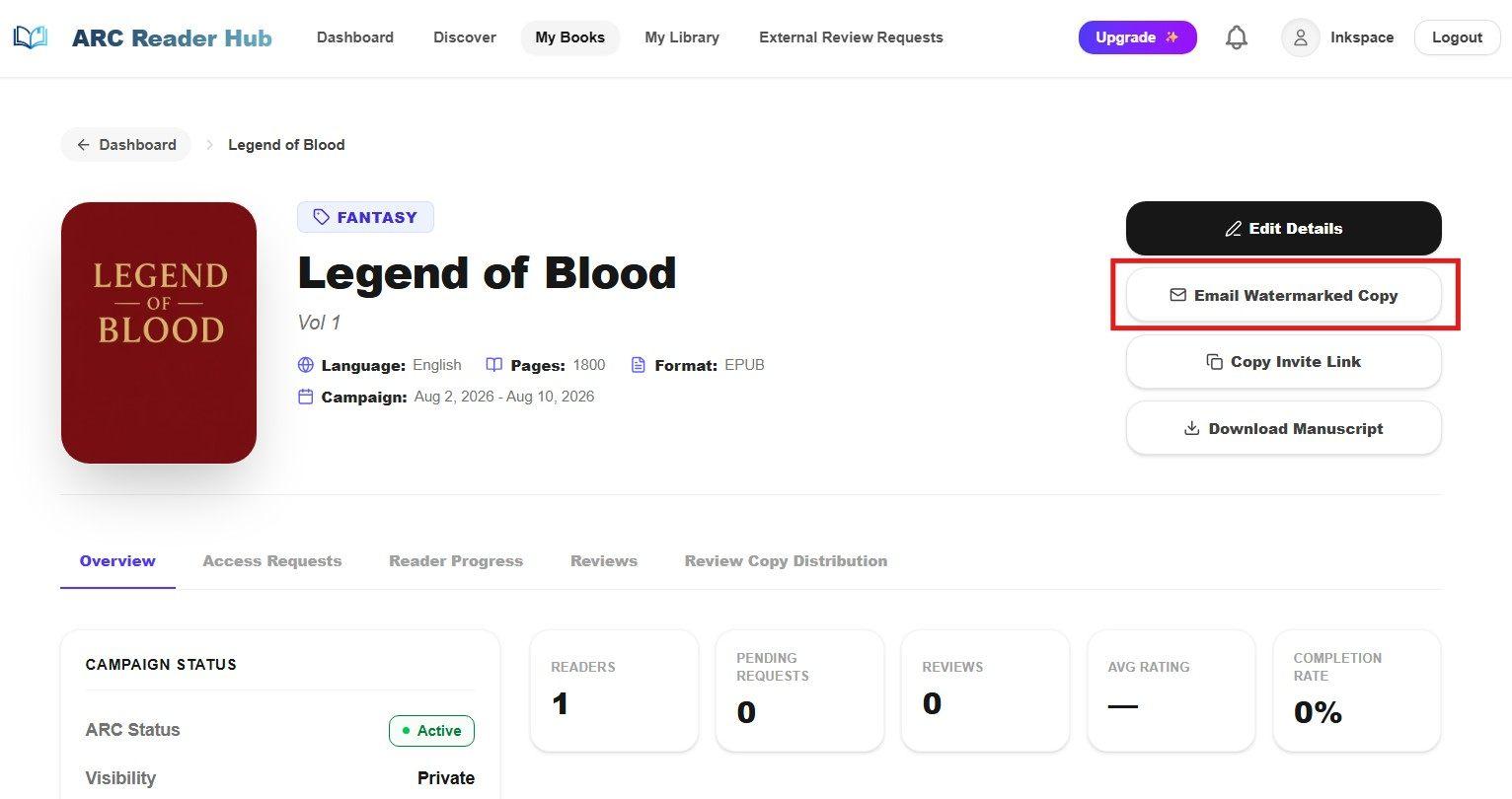
Access External Kindle Distribution
Manage individual review copy deliveries directly from your dashboard
Navigate to your Author Dashboard or campaign details page. Locate the External Distribution section to send ARC copies directly to specific reviewers, newsletter subscribers, or book bloggers without making your campaign public.
Key Actions:
- Switch to "Author View" on your main ARC Reader Hub dashboard.
- Select and open your target book campaign.
- Click the "Email Watermarked Copy" button to launch the guided Kindle delivery workflow.
Enter Reviewer Email & Personalization
Specify the recipient email address and optional personal note
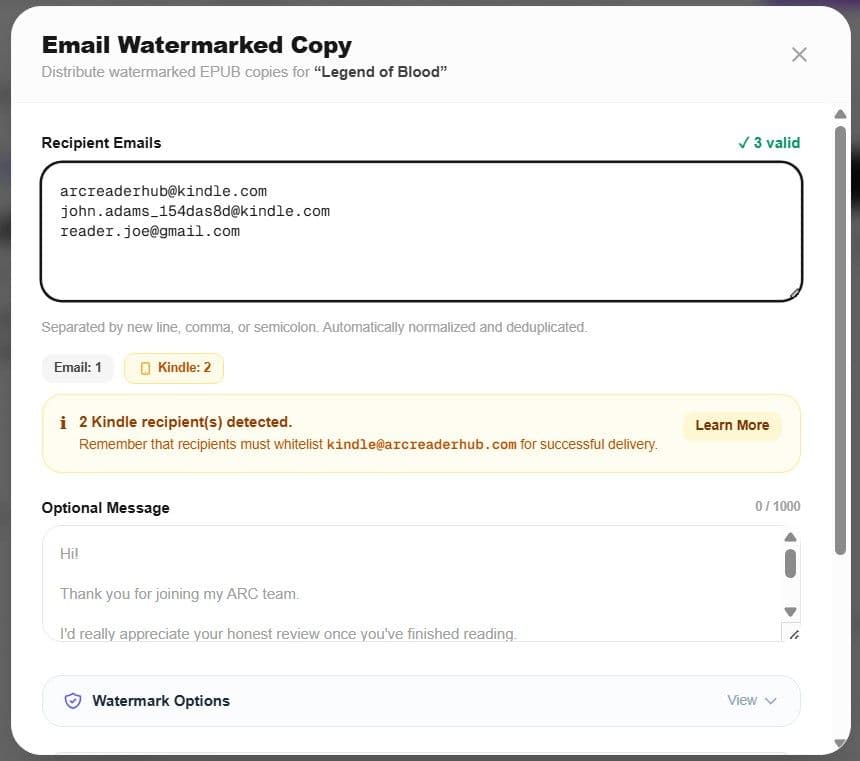
Input the reviewer’s email address in the modal popup. ARC Reader Hub will generate a secure, watermarked copy of the EPUB and send directly to readers kindle or personal email.
Key Actions:
- Enter the recipient’s standard email or personal @kindle.com address.
- Add an optional personal message or review guidelines for the reviewer.
Apply Dynamic Watermark & Deliver
Protect your manuscript with recipient metadata and anti-piracy header/footer text
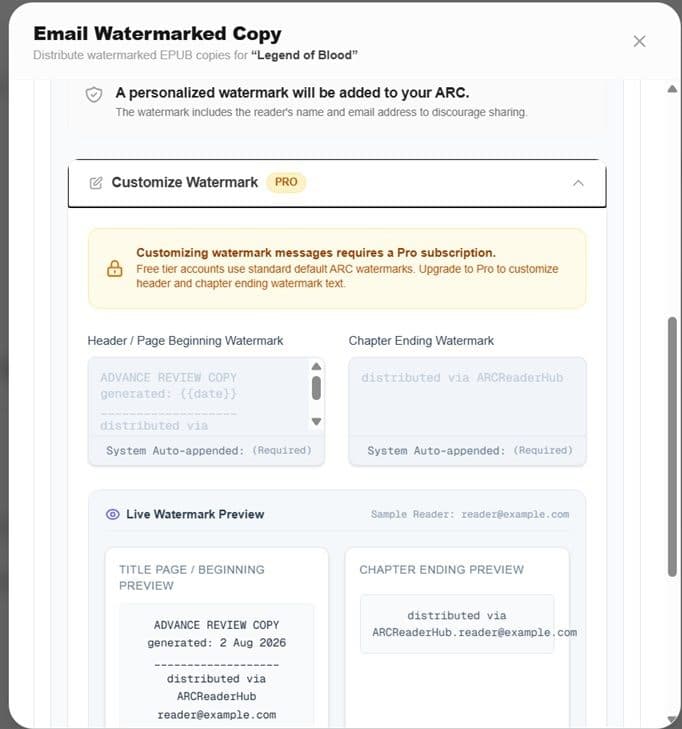
Before sending, select your dynamic watermarking options. ARC Reader Hub embeds the reviewer’s details and your custom header/footer text into every page of the EPUB file to prevent unauthorized file sharing.(Watermark customization is only available for PRO users)
Key Actions:
- Customize the Header and Footer watermark text (e.g., "Advance Review Copy - Property of Author").
- Preview how recipient identifiers will be embedded dynamically into the manuscript.
- Click "Send Review Copy" to immediately process and dispatch the watermarked file to the reviewer’s Kindle.
Everything Authors Need to Know About Kindle Delivery
How does Send to Kindle protect my manuscript against piracy?
Every file sent to Kindle through ARC Reader Hub is dynamically stamped with encrypted recipient metadata and customizable header/footer text. If a copy is leaked, the recipient ID can be traced immediately, effectively deterring file sharing.
Do reviewers need to approve my email on Amazon before receiving files?
Yes. For direct @kindle.com delivery, Amazon requires readers to add our official delivery email (kindle@arcreaderhub.com) to their "Approved Personal Document E-mail List" in Amazon account settings. We provide readers with a 1-click guide to set this up.
Can I send Kindle review copies to reviewers who are not registered on the platform?
Yes! The External Review Distribution feature allows authors to send watermarked Kindle review copies to any email address. The recipient receives a secure claim link without needing a pre-existing account.
What file formats are supported for Kindle delivery?
ARC Reader Hub automatically converts and optimizes your uploaded EPUB manuscript so it renders flawlessly on Amazon Kindle Paperwhite, Oasis, Scribe, and Kindle mobile apps.
Ready to Launch Your Book & Distribute to Kindle?
Set up your campaign on ARC Reader Hub for free. Protect your manuscript with dynamic watermarks and send directly to early reviewers.