Author's Step-by-Step Campaign Guide
A comprehensive, visual walkthrough showing authors how to upload books, configure review schedules, manage applications, and successfully collect early reviews.
Step 1: Access the Author Dashboard
Once you log in as an Author, you are greeted by the Author Dashboard. This is your control center. It displays a summary of your active ARC campaigns, reviewer request statistics, and draft setups. To start a new campaign, simply click the Upload New Book button.
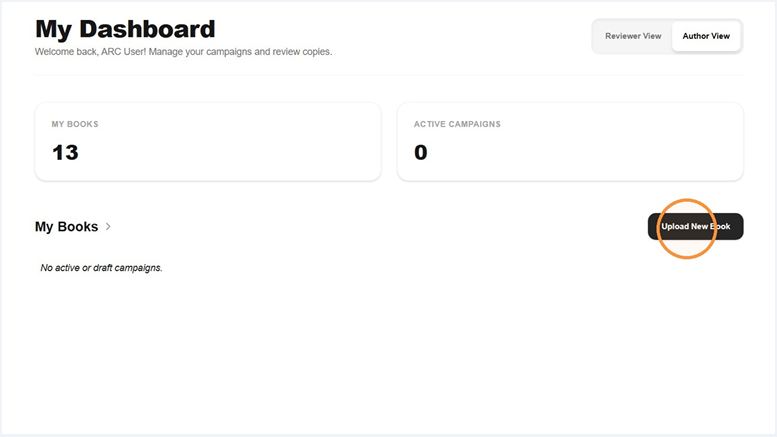
Figure 1: The Author Dashboard showcasing campaign status and navigation options.
Step 2: Upload Your Book & Setup the Campaign
The book creation form compiles all metadata, cover illustrations, and draft files for your campaign. Correctly filling out this section helps readers discover your book and understand your review guidelines.
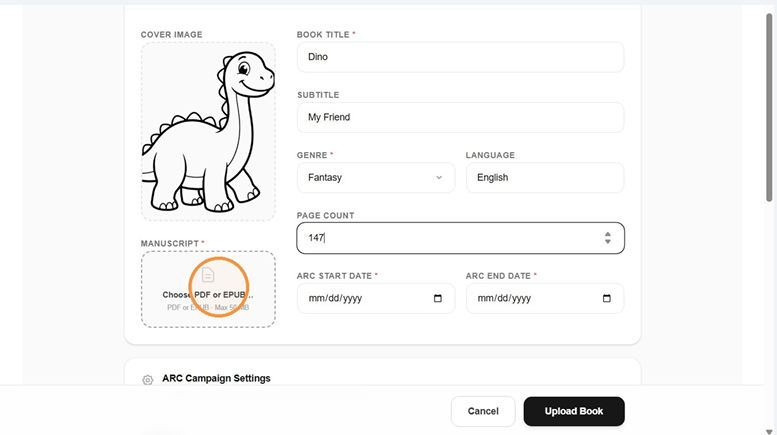
Figure 2: The New ARC campaign configuration form.
Form Sections Breakdown
1. Book Metadata
Enter the Title, Subtitle, and Description/Synopsis. Select a fitting Genre (e.g., Thriller, Fantasy) and document the language and page count.
2. Manuscript Files
Upload your book cover image (JPG/PNG) and the draft manuscript (PDF/EPUB). Manuscripts are stored securely to prevent raw file downloads.
3. Custom Screening Questions
If Visibility is set to Private, you can enable screening questions to vet applicants (re-using past forms, selecting quick-adds, or building custom form fields).
4. Campaign Schedules
Set the ARC Start Date (when approved reviewers can begin reading) and the ARC End Date (usually corresponding to your official book launch).
5. Reader Access & Limits
Specify reviewer limits and enforce security options like Read in Browser Only to restrict direct downloads.
Step 3: Manage Reviewers & Accept Applications
When readers request access to your ARC, their requests appear in your campaign dashboard. You can review applicant details (including a custom message from the reader and their historical completion scores) and click Approve or Decline.
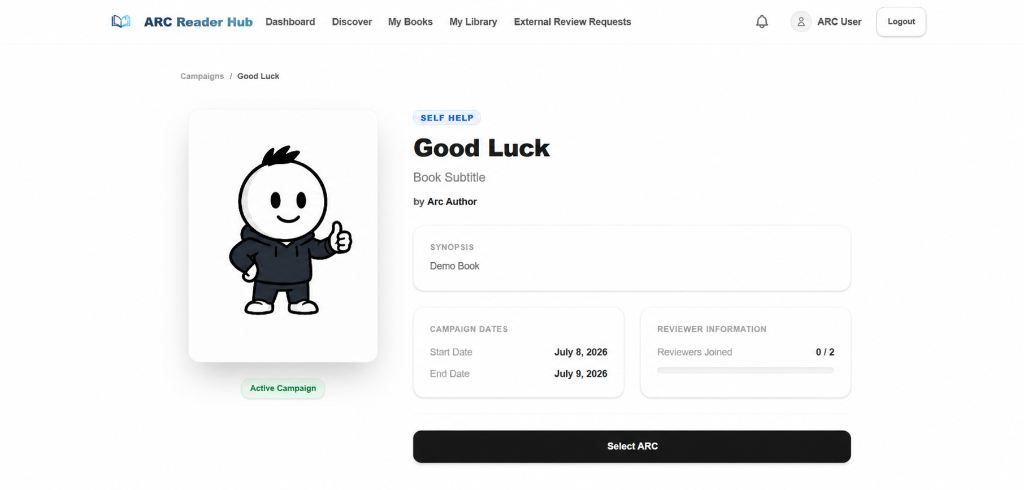
Figure 3: Approving or managing reader applications.
Step 4: Monitor Progress & Collect Reviews
Once approved, readers can view the manuscript inside the secure browser reader. The platform tracks their reading percentage and active reading duration. You can follow their progress and review their submitted private typos or notes to improve formatting prior to publishing the final book.
Launch Your First Book Campaign
Ready to upload your manuscript and connect with reviewers? Set up your free account today and get early social proof.